
Why Your Desk Lamp May Be Making Screen Fatigue Worse
Eyes burning by 4 p.m.? Your desk lamp's color temperature, brightness, and position may be the real culprit behind screen fatigue. Here's what changed in our home-office setup.
This article contains affiliate links. We may earn a commission at no extra cost to you.
Six years of working from home, and by 4 p.m. my eyes were staging a daily protest.
I blamed the obvious suspect: too much screen time. My job keeps me glued to a computer most of the day, so tired eyes seemed like the cost of doing business.
Except the screen wasn't the whole story.
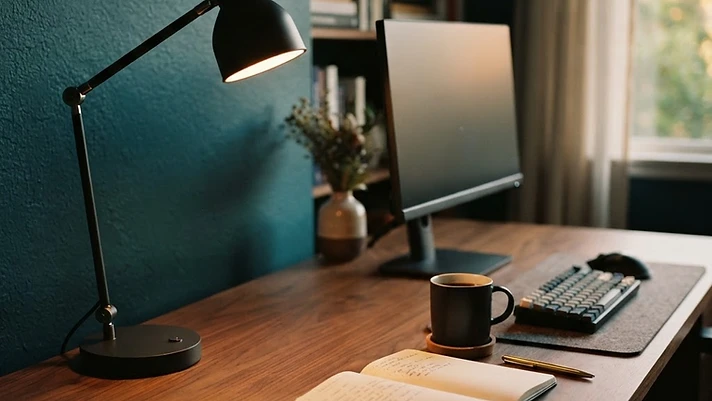
The desk lamp beside it was too cool, too bright, and angled just wrong enough to bounce glare across my monitor all afternoon. I'd added the lamp to make my workspace cozier. Instead, the wrong light was making an already screen-heavy day feel worse.
I switched to the lamp we tested at Work Well WFH and changed how I used it. Within a week, I made it through a full workday without the usual late-afternoon eye burn.
Small change — exactly the kind we're built around: gear that earns its desk space by solving an actual problem.
Our tested pick: Shop the BenQ e-Reading LED Desk Lamp on Amazon
As an Amazon Associate, Work Well WFH may earn from qualifying purchases at no extra cost to you. We only recommend gear we think genuinely earns its place on your desk.
The problem wasn't just brightness
When a desk feels dark, the instinct is to throw more lumens at it. But comfortable home-office lighting isn't about producing more light — it's about the right light landing in the right place.
Three things were quietly working against me:
1. The color temperature was wrong for the time of day
Color temperature describes how warm or cool a light appears. Lower numbers read warmer and more amber. Higher numbers read cooler and bluer.
Cool light can feel crisp and useful for detailed work, but it was far too harsh in my office late in the day. An adjustable lamp let me use a more neutral setting during focused work and shift warmer as the afternoon wore on.
As a practical starting point:
- 2700K–3000K: warm light for late afternoons, ambient lighting, or lower-intensity work
- 3500K–4500K: neutral white for general desk work and video calls
- 5000K–6500K: cool daylight for detailed tasks, if that range feels comfortable to you
There's no universally perfect setting. Room color, natural light, personal sensitivity, and the time of day all change how a lamp feels.
2. The lamp was reflecting off the monitor
My old lamp lit more than the desk. It also painted a reflection across the screen — subtle enough that I didn't consciously notice it, but strong enough that I spent the day looking through it.
The fix was simple: I moved the lamp to the side and aimed the light at my work surface instead of toward the monitor. An adjustable arm made that much easier.
Try sitting in your normal working position with the screen turned off. If you can see the lamp, the bulb, or a bright streak reflected in the dark monitor, reposition the light until the reflection fades or disappears.
3. The contrast between the screen and the room was too high
A bright monitor in a dim room creates a constant contrast your eyes have to manage. A single intense task lamp creates the same problem in reverse.
Instead of asking one lamp to light the entire room, use layers:
- Soft ambient light for the room
- Adjustable task light aimed at the desk
- Gentle front light for video calls, when needed
The goal isn't to make everything brighter. It's to build a more balanced field of light around the screen.
The lamp that changed my setup
The BenQ e-Reading LED Desk Lamp isn't the cheapest desk lamp for computer work on Amazon, and that's worth saying plainly. It earned its place in my office because it addressed the specific things my old lamp couldn't.
Its wide light coverage works well across a computer desk, while the adjustable brightness and color temperature make it possible to change the light as the room changes throughout the day. The flexible arm also helps direct light toward the desk instead of letting it bounce off the monitor.
Why it helps
- Adjustable color temperature for cooler or warmer light
- Dimmable brightness instead of one fixed intensity
- Wide illumination for larger desks or multi-monitor setups
- Flexible positioning to help keep direct glare off the screen
- Automatic adjustment based on surrounding light
Why we like it
It doesn't try to be a decorative object that happens to produce light. It's built for desks, screens, reading, and long stretches of focused work. Once it's positioned correctly, it quietly does its job.
That's our standard for home-office gear: no hype, no "game-changing" claims — just a product that solves a real problem well enough to earn the space it takes up.
A more affordable option
If the BenQ is more than you want to spend, look for a lamp with an adjustable arm and pair it with a dimmable LED bulb that lets you control color temperature.
The LEPOWER Metal Desk Lamp is a simpler budget option. It doesn't offer the same built-in lighting controls, so the bulb you choose matters more. Still, its adjustable arm makes it easier to aim light at the work surface and away from the screen — which is most of the battle.
How to fix your desk lighting today
You may not need to buy anything yet. Start with the lamp already on your desk:
- Check for reflections. Turn off your monitor and look for the lamp or bulb reflected in the screen.
- Move the lamp to the side. Aim it at your keyboard, notebook, or work surface — not at the display.
- Lower the brightness. Match the lamp and monitor to the room rather than leaving either at maximum.
- Try a warmer setting after lunch. If your bulb or lamp is adjustable, see whether warmer light feels more comfortable later in the day.
- Add soft room light. A shaded floor lamp can reduce the stark contrast between a bright screen and a dark background.
For a full room-lighting setup, read our guide to the best home-office lighting for dark rooms and winter workdays.
The takeaway
If your eyes feel tired at the end of every remote-work day, screen time may be part of the story — but don't ignore the light sitting next to the screen.
The wrong color temperature, direct glare, and uneven brightness can turn a perfectly good desk into an uncomfortable place to work. In my case, changing the lamp and its position made a difference within days.
Take 30 seconds to look at your screen with the monitor turned off. That reflection you barely notice may be the first clue.
Ready to change the light, not the whole office? Shop our tested BenQ desk lamp on Amazon
Persistent eye pain, burning, headaches, or vision changes can have causes unrelated to workspace lighting. Talk with a qualified eye-care professional if symptoms continue.
Frequently asked questions
What color light is best for computer work?
Neutral white light in the 3500K–4500K range is a useful starting point for most workspaces. Warmer light may feel more comfortable later in the day, while cooler light can suit detailed tasks. Personal comfort and room conditions matter more than chasing one supposedly perfect number.
Where should a desk lamp be placed to reduce monitor glare?
Place it beside the monitor and aim the light down toward the desk. Avoid putting a bare bulb in front of the screen or anywhere it creates a visible reflection. If you write by hand, placing the lamp opposite your dominant hand also helps reduce shadows.
Is a brighter desk lamp better for eye strain?
Not necessarily. A very bright lamp in an otherwise dim room creates uncomfortable contrast. Adjustable brightness, good placement, and balanced room lighting generally do more for eye comfort than maximum brightness alone.
Can a desk lamp eliminate eye strain?
No lamp can promise that. Lighting is one part of a comfortable workstation, alongside screen settings, breaks, viewing distance, and vision needs. A better lamp can help fix glare or poor lighting, but ongoing symptoms should be discussed with an eye-care professional.
Related guides

Home Office Upgrades That Are Actually Worth Your Money
Not every home office gadget deserves your money. Here are 9 practical home office upgrades that can actually make working from home better, plus a few to skip.

Gifts for People Who Work From Home (That Won't End Up in a Drawer)
Shopping for someone who works from home? Skip the third 'World's Best Boss' mug. Here are 15 WFH gifts that actually earn desk space — from a heated back massager to a cat lamp that's weirder (and more useful) than it sounds.

Portable Office Setup for Hybrid Work: 8 Essentials Worth Carrying
Hybrid work means carrying half your desk back and forth. Here are eight portable office essentials that actually earn their spot in your bag — and two you can probably skip.
Make WFH slightly less ridiculous
Setup ideas, gear finds, and realistic advice for people who are tired of pretending their home office is fine.
By joining you agree to our privacy policy. Unsubscribe anytime.